
Filter Queries and bot.on()
The first argument of bot is a string called filter query.
Introduction
Most (all?) other bot frameworks allow you to perform a primitive form of filtering for updates, e.g. only on("message") and the like. Other filtering of messages is left to the developer, which often leads to endless if statements in their code.
On the contrary, grammY ships with its own query language that you can use in order to filter for exactly the messages you want.
This allows for over 1150 different filters to be used, and we may add more over time. Every valid filter can be auto-completed in your code editor. Hence, you can simply type bot, open auto-complete, and search through all queries by typing something.
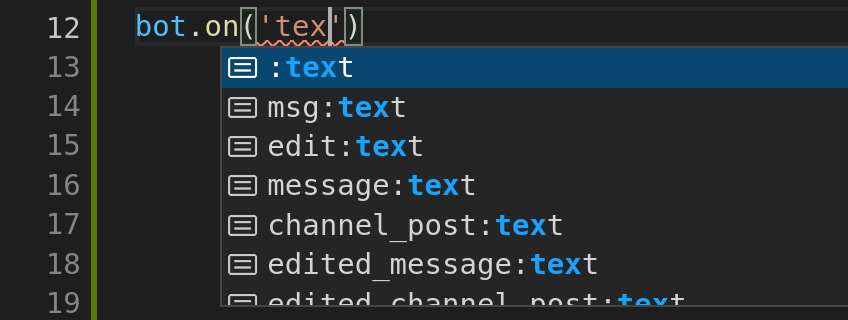
The type inference of bot will comprehend the filter query you picked. It therefore tightens a few types on the context that are known to exist.
bot.on("message", async (ctx) => {
  // Could be undefined if the received message has no text.
  const text: string | undefined = ctx.msg.text;
});
bot.on("message:text", async (ctx) => {
  // Text is always present because this handler is called when a text message is received.
  const text: string = ctx.msg.text;
});In a sense, grammY implements the filter queries both at runtime, and on the type level.
Example Queries
Here are some example queries:
Regular Queries
Simple filters for updates, and sub-filters:
bot.on("message"); // called when any message is received
bot.on("message:text"); // only text messages
bot.on("message:photo"); // only photo messagesFilter for Entities
Sub-filters that go one level deeper:
bot.on("message:entities:url"); // messages containing a URL
bot.on("message:entities:code"); // messages containing a code snippet
bot.on("edited_message:entities"); // edited messages with any kind of entitiesOmit Values
You can omit some values in the filter queries. grammY will then search through different values to match your query.
bot.on(":text"); // any text messages and any text post of channels
bot.on("message::url"); // messages with URL in text or caption (photos, etc)
bot.on("::email"); // messages or channel posts with email in text or captionLeaving out the first value matches both messages and channel posts. Remember that ctx gives you access to both messages or channel posts, whichever is matched by the query.
Leaving out the second value matches both entities and caption entities. You can leave out both the first and the second part at the same time.
Shortcuts
The query engine of grammY allows to define neat shortcuts that group related queries together.
msg
The msg shortcut groups new messages and new channel posts. In other words, using msg is equivalent to listening for both "message" and "channel events.
bot.on("msg"); // any message or channel post
bot.on("msg:text"); // exactly the same as `:text`edit
This edit shortcut groups edited messages and edited channel posts. In other words, using edit is equivalent to listening for both "edited and "edited events.
bot.on("edit"); // any message or channel post edit
bot.on("edit:text"); // edits of text messages
bot.on("edit::url"); // edits of messages with URL in text or caption
bot.on("edit:location"); // live location updated:media
The : shortcut groups photo and video messages. In other words, using : is equivalent to listening for both ": and ": events.
bot.on("message:media"); // photo and video messages
bot.on("edited_channel_post:media"); // edited channel posts with media
bot.on(":media"); // media messages or channel posts:file
The : shortcut groups all messages that contain a file. In other words, using : is equivalent to listening for ":, ":, ":, ":, ":, ":, ":, and ": events. Hence, you can be sure that await ctx will give you a file object.
bot.on(":file"); // files in messages or channel posts
bot.on("edit:file"); // edits to file messages or file channel postsSyntactic Sugar
There are two special cases for the query parts that make filtering for users more convenient. You can detect bots in queries with the : query part. The syntactic sugar : can be used to refer to your bot from within a query, which will compare the user identifiers for you.
// A service message about a bot that joined the chat
bot.on("message:new_chat_members:is_bot");
// A service message about your bot being removed
bot.on("message:left_chat_member:me");Note that while this syntactic sugar is useful to work with service messages, it should not be used to detect if someone actually joins or leaves a chat. Services messages are messages that inform the users in the chat, and some of them will not be visible in all cases. For example, in large groups, there will not be any service messages about users that join or leave the chat. Hence, your bot may not notice this. Instead, you should listen for chat member updates.
Combining Multiple Queries
You can combine any number of filter queries with AND as well as OR operations.
Combine With OR
If you want to install some piece of middleware behind the OR concatenation of two queries, you can pass both of them to bot in an array.
// Runs if the update is about a message OR an edit to a message
bot.on(["message", "edited_message"] /* , ... */);
// Runs if a hashtag OR email OR mention entity is found in text or caption
bot.on(["::hashtag", "::email", "::mention"] /* , ... */);The middleware will be executed if any of the provided queries matches. The order of the queries does not matter.
Combine With AND
If you want to install some piece of middleware behind the AND concatenation of two queries, you can chain the calls to bot.
// Matches forwarded URLs
bot.on("::url").on(":forward_origin" /* , ... */);
// Matches photos that contain a hashtag in a photo's caption
bot.on(":photo").on("::hashtag" /* , ... */);The middleware will be executed if all of the provided queries match. The order of the queries does not matter.
Building Complex Queries
It is technically possible to combine filter queries to more complicated formulas if they are in CNF, even though this is unlikely to be useful.
bot
  // Matches all channel posts or forwarded messages ...
  .on(["channel_post", ":forward_origin"])
  // ... that contain text ...
  .on(":text")
  // ... with at least one URL, hashtag, or cashtag.
.on(["::url", "::hashtag", "::cashtag"] /* , ... */);The type inference of ctx will scan through the entire call chain and inspect every element of all three .on calls. As an example, it can detect that ctx is a required property for the above code snippet.
Useful Tips
Here are some less-known features of filter queries that can come in handy. Some of them are a little advanced, so feel free to move on to the next section.
Chat Member Updates
You can use the following filter query to receive status updates about your bot.
bot.on("my_chat_member"); // block, unblock, join, or leaveIn private chats, this triggers when the bot is blocked or unblocked. In groups, this triggers when the bot is added or removed. You can now inspect ctx to figure out what exactly happened.
This is not to be confused with
bot.on("chat_member");which can be used to detect status changes of other chat members, such as when people join, get promoted, and so on.
Note that
chatupdates need to be enabled explicitly by specifying_member allowedwhen starting your bot._updates
Combining Queries With Other Methods
You can combine filter queries with other methods on the Composer class (API Reference), such as command or filter. This allows for powerful message handling patterns.
bot.on(":forward_origin").command("help"); // forwarded /help commands

// Only handle commands in private chats.
const pm = bot.chatType("private");
pm.command("start");
pm.command("help");Filtering by Message Sender Type
There are five different possible types of message authors on Telegram:
- Channel post authors
- Automatic forwards from linked channels in discussion groups
- Normal user accounts, this includes bots (i.e. “normal” messages)
- Admins sending on behalf of the group (anonymous admins)
- Users sending messages as one of their channels
You can combine filter queries with other update handling mechanisms to find out the type of the message author.
// Channel posts sent by `ctx.senderChat`
bot.on("channel_post");

// Automatic forward from the channel `ctx.senderChat`:
bot.on("message:is_automatic_forward");
// Regular messages sent by `ctx.from`
bot.on("message").filter((ctx) => ctx.senderChat === undefined);
// Anonymous admin in `ctx.chat`
bot.on("message").filter((ctx) => ctx.senderChat?.id === ctx.chat.id);
// Users sending messages on behalf of their channel `ctx.senderChat`
bot.on("message").filter((ctx) =>
  ctx.senderChat !== undefined && ctx.senderChat.id !== ctx.chat.id
);Filtering by User Properties
If you want to filter by other properties of a user, you need to perform an additional request, e.g. await ctx for the author of the message. Filter queries will not secretly perform further API requests for you. It is still simple to perform this kind of filtering:
bot.on("message").filter(
  async (ctx) => {
    const user = await ctx.getAuthor();
    return user.status === "creator" || user.status === "administrator";
  },
  (ctx) => {
    // Handles messages from creators and admins.
  },
);Reusing Filter Query Logic
Internally, bot relies on a function called match. It takes a filter query and compiles it down to a predicate function. The predicate is simply passed to bot in order to filter for updates.
You can import match directly if you want to use it in your own logic. For example, you can decide to drop all updates that match a certain query:
// Drop all text messages or text channel posts.
bot.drop(matchFilter(":text"));Analogously, you can make use of the filter query types that grammY uses internally:
Reusing Filter Query Types
Internally, match uses TypeScript’s type predicates to narrow down the type of ctx. It takes a type C extends Context and a Q extends Filter and produces ctx is Filter<C. In other words, the Filter type is what you actually receive for your ctx in the middleware.
You can import Filter directly if you want to use it in your own logic. For example, you can decide to define a handler function that handles specific context objects which were filtered by a filter query:
function handler(ctx: Filter<Context, ":text">) {
  // handle narrowed context object
}

bot.on(":text", handler);Check out the API references for
match,Filter Filter, andFilterto read on.Query
The Query Language
This section is meant for users who want to have a deeper understanding of filter queries in grammY, but it does not contain any knowledge required to create a bot.
Query Structure
Every query consists of up to three query parts. Depending on how many query parts a query has, we differentiate between L1, L2, and L3 queries, such as "message", "message:, and "message:, respectively.
The query parts are separated by colons (:). We refer to the part up to the first colon or the end of the query string as the L1 part of a query. We refer to the part from the first colon to the second colon or to the end of the query string as the L2 part of the query. We refer to the part from the second colon to the end of the query string as the L3 part of the query.
Example:
| Filter Query | L1 part | L2 part | L3 part |
|---|---|---|---|
"message" | "message" | undefined | undefined |
"message: | "message" | "entities" | undefined |
"message: | "message" | "entities" | "mention" |
Query Validation
Even though the type system should catch all invalid filter queries at compile time, grammY also checks all passed filter queries at runtime during setup. Every passed filter query is matched against a validation structure that checks if it is valid. Not only is it good to fail immediately during setup instead of at runtime, it has also happened before that bugs in TypeScript cause serious problems with the sophisticated type inference system that powers filter queries. If this happens again in the future, this will prevent issues that could otherwise occur. In this case, you will be provided with helpful error messages.
Performance
grammY can check every filter query in (amortized) constant time per update, independent of the structure of the query or the incoming update.
The validation of the filter queries happens only once, when the bot is initialized and bot is called.
On start-up, grammY derives a predicate function from the filter query by splitting it into its query parts. Every part will be mapped to a function that performs a single truthiness check for an object property, or two checks if the part is omitted and two values need to be checked. These functions are then combined to form a predicate that only has to check for as many values as are relevant for the query, without iterating over the object keys of Update.
This system uses less operations than some competing libraries, which need to perform containment checks in arrays when routing updates. grammY’s filter query system is faster despite being much more powerful.
Type Safety
As mentioned above, filter queries will automatically narrow down certain properties on the context object. The predicate derived from one or more filter queries is a TypeScript type predicate that performs this narrowing. In general, you can trust that type inference works correctly. If a property is inferred to be present, you can safely rely on it. If a property is inferred to be potentially absent, then this means that there are certain cases of it missing. It is not a good idea to perform type casts with the ! operator.
It may not be obvious to you what those cases are. Don’t hesitate to ask in the group chat if you cannot figure it out.
Computing these types is complicated. A lot of knowledge about the Bot API went into this part of grammY. If you want to understand more about the basic approaches to how these types are computed, there is a talk on You